Release Monitoring with Automation for Jira
We like automation, we like monitoring releases
So your organisation has decided to build a Internal Developer Portal (IDP) using Backstage. All of a sudden you're responsible for looking after a quickly growing, forever updating production environment, as well as an IDP?
You may even have a request from your SEM along the lines of this:
Monthly there is a version bump of Backstage (i.e 1.14.x -> 1.15.0) We need to keep up with these releases as this reduces issues with security etc - however with this release we also need to update the plugin dependencies.
What do you do about:
- Monitoring new releases
- Making decisions about new features
- Breaking changes
- Plugins breaking
You monitor the releases in a Jira project backlog of course!
Here is how I did it with automation…
I wanted to create a new task whenever a new release of Backstage is rolled out on the main Github page backstage/backstage. The task could then be broken down into smaller pieces of work or spikes so I could monitor builds or raise pull requests directly from Jira using the GitHub integration.
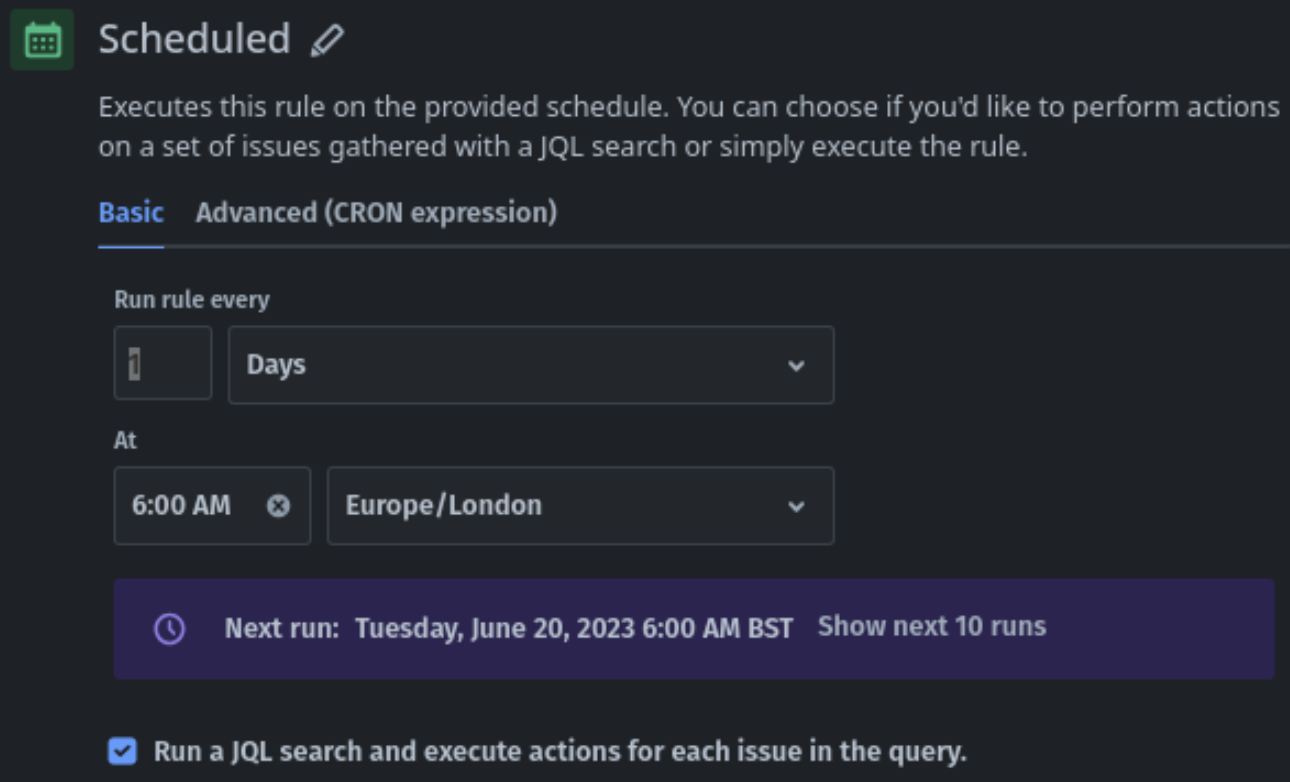
Setting up the Schedule
For the scheduled automation to work I created a custom field in Jira called 'Release Tag', which is where the release tag will be stored.
The specifics of the JQL might need adjusting depending on your circumstances but an example may go like:
issuetype = epic and 'Release Tag' is not EMPTY
Because the scheduled automation requires a ticket to be present I had to make a 'dummy' ticket with the release tag of a previous release added to it, so when the schedule runs the JQL can find a ticket and trigger the subsequent automation. There is a space at the bottom of the following example when you're creating a scheduled automation to add JQL.
The Web Request
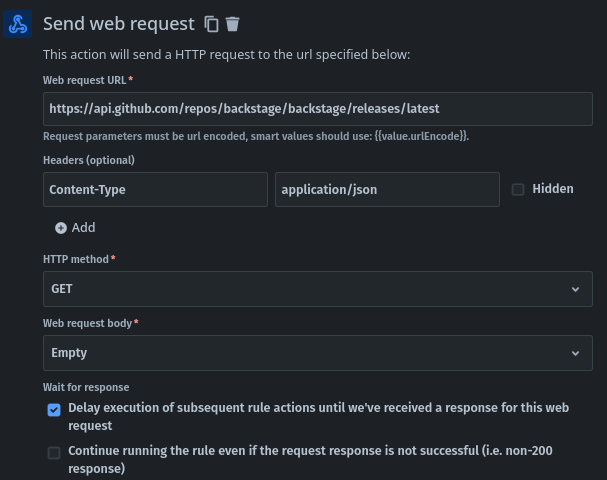
The automation will make a request to a public endpoint, so there was need for a Personal Access Token (PAT). Since the request frequency is once a day, it remains within rate limits. The request is made to the following URL:
Then I added optional headers to ensure the content type is correctly interpreted:
Content-Type: application/json
This is a GET HTTP method, and I didn't anticipate any issue references in the body, simply can choose 'Empty'.
It's crucial to delay execution until we receive a response from this web request!
Create Variable
The web response body will look a bit like the snipped example:
}
  // ...
  "node_id": "RE_kwDODhKIWM4Gb0sX",
  "tag_name": "v1.14.2",
  "target_commitish": "master",
  "name": "v1.14.2",
  "draft": false,
  "prerelease": false,
  "created_at": "2023-06-09T09:30:18Z",
  "published_at": "2023-06-09T09:30:19Z",
  "assets": [

  ],
  "tarball_url": "https://api.github.com/repos/backstage/backstage/tarball/v1.14.2",
  "zipball_url": "https://api.github.com/repos/backstage/backstage/zipball/v1.14.2",
  "body": "This release fixes an issue where the search bar styling would break.",
 // ...
}
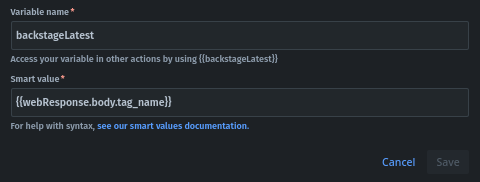
To extract the tag_name, I created a variable using the newer feature, referring to the {{webResponse.body}} (the curly brackets are to use Jira smart values) to retrieve the response body, and then pointing to the tag_name. This creates a variable named backstageLatest that can be referenced in subsequent actions.
Create a new ticket
I then used the 'If: Matches' conditional module to verify if backstageLatest is greater than the release number in the custom release field. If it is, then I want to create a new ticket in the backlog with:
- Summary: Backstage
{{backstageLatest}}New Release - Description:
{{webResponse.body.body}} - Label: On-going Backstage Maintenance
If the conditions don't match, the automation doesn't perform any actions.

Conclusion
By following the above steps, you can set up a process to automatically monitor GitHub releases and track your dependencies. This will save you time and effort to manually check for new releases.
Future suggestions/ideas:
- Trigger builds in your CI/CD if conditionals pass, or a status matches 'release'
- Enrich tickets but using Key Values from the json response to further automate the process
Use this idea for other dependencies
If you have any other ideas or questions please reach out.